

Tatva ERP
Bill fast. Close the books faster.
Tatva ERP is GST billing and accounting software for Indian shops, distributors and firms. It runs sale, purchase, returns and quotations, keeps stock by batch, expiry or size, posts receipts, payments, journal and contra into real double-entry books, and produces the registers, final accounts and GSTR-1, GSTR-2 and GSTR-3B with the portal JSON. It is multi-company and multi-branch, keyboard-first, and runs in a browser on any laptop.

- F8
- a sale from anywhere in the software
- GSTR-1
- with the portal JSON, not a screenshot
- Batch · size
- stock for pharmacy, FMCG and garments
- Multi-branch
- one login, separate books per GSTIN
Built for the business most of India actually has.
- Retail counters: grocery, general stores, hardware, electrical
- Medical stores and pharmaceutical distributors
- FMCG, dairy and food distributors with batch and expiry stock
- Garment and footwear shops that need size-wise stock
- Traders and firms that want books, not only bills
- Businesses with two or more branches under one or more GSTINs
12 modules, one login.
Every module shares the same record, so nothing is typed twice and nothing is reconciled at month end.
- 01
Sale and purchase
F8 and F9. Party, items, batch, expiry and rates in one grid, saved with Ctrl+S.
- 02
Returns and quotations
Sale and purchase returns against the original bill, and quotations that become sales without retyping.
- 03
Batch, expiry and size
Stock by batch with earliest-expiry picking and expired stock blocked, or by size for garments and footwear.
- 04
Barcode billing
Item, item code or batch barcode; scanning the same code again adds quantity. A phone can pair as a second scanner.
- 05
Receipts, payments, journal, contra
Real double entry behind the bills, with receipts adjusted bill by bill.
- 06
Registers
Sale, purchase and return registers by month, date, party or bill, with drill-down to the voucher and CSV export.
- 07
Outstanding and ageing
Bill-wise dues with first-in-first-out ageing, and the overdue list on the dashboard.
- 08
Stock reports
Stock summary on weighted average, batch-wise stock, expiring batches and a stock ledger for every item.
- 09
Final accounts
Day book, ledger statement, trial balance, profit and loss in T-format and balance sheet.
- 10
GST returns
GSTR-1 with the portal JSON, GSTR-2 with input tax credit, GSTR-3B with the rule 88A set-off, and the HSN summary.
- 11
Multi-company and multi-branch
A company for each GSTIN, branches with their own stock and invoice series, one key to switch.
- 12
Financial years
Year-wise books with a carry-forward wizard for balances, stock and pending bills, and a lock date.
Screens your staff will actually use.
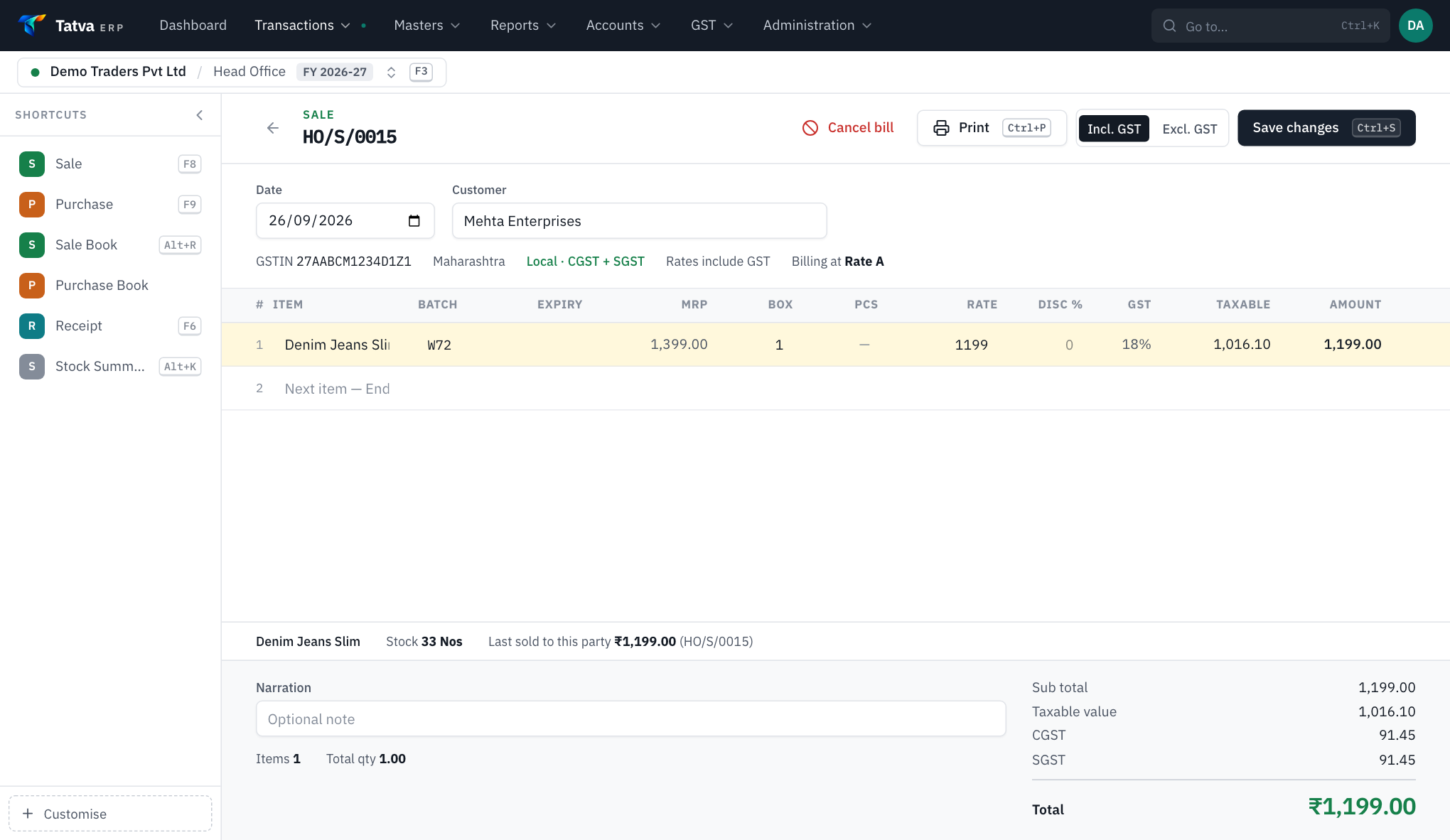
A GST sale bill in Tatva ERP with batch, MRP, rate, GST and taxable value per line
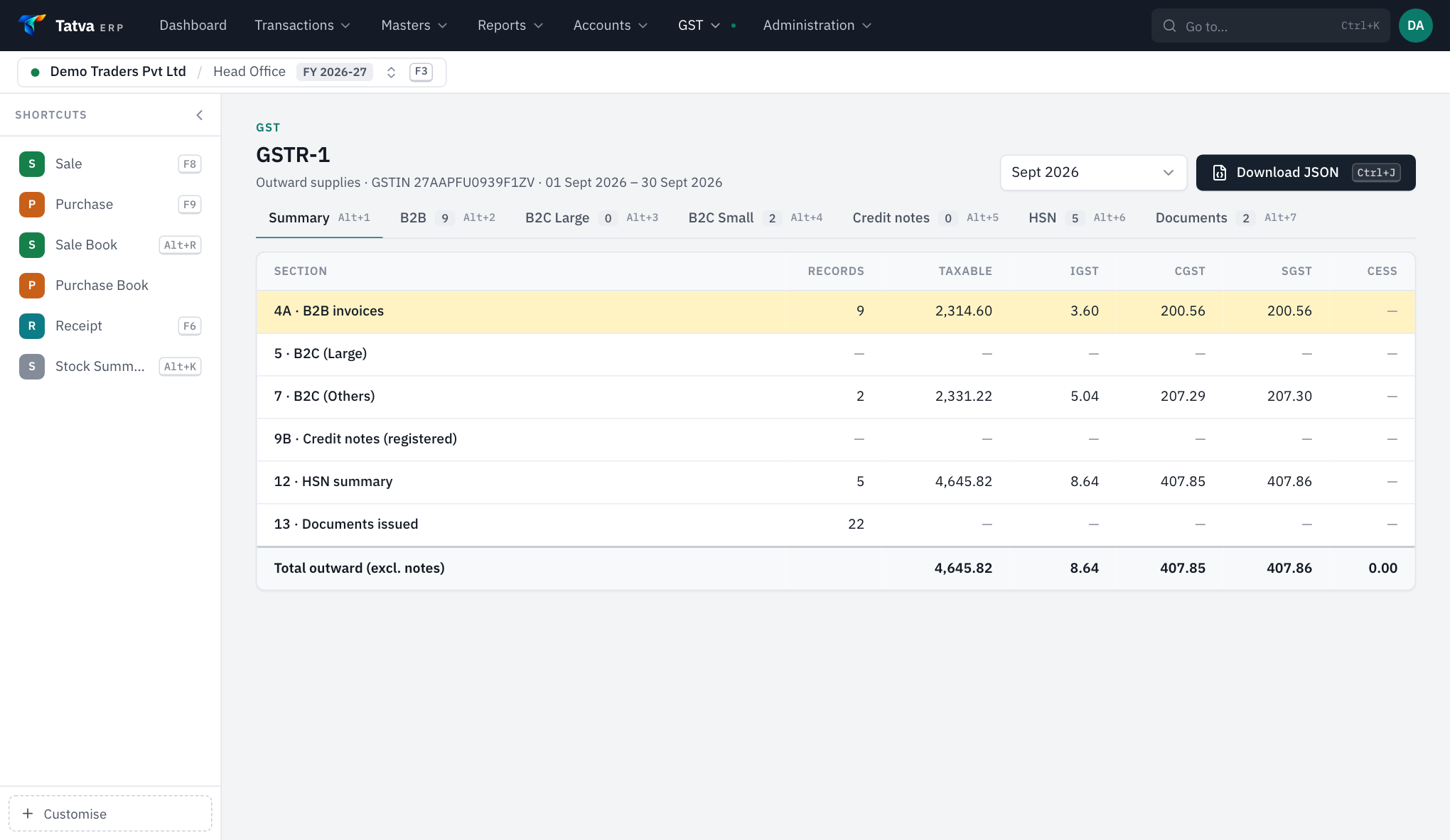
The GSTR-1 summary in Tatva ERP with B2B, B2C and HSN sections and a download JSON button
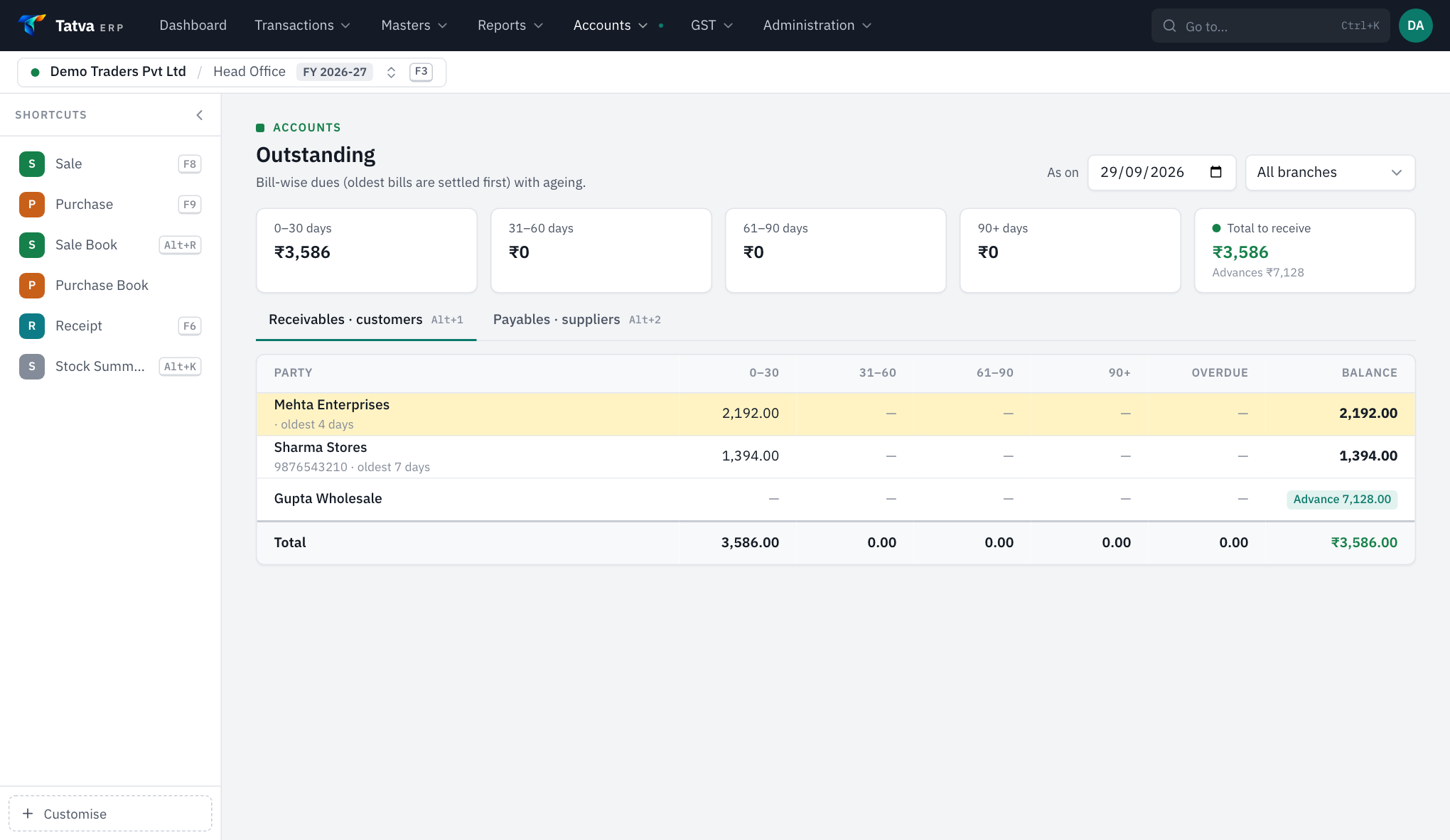
Bill-wise outstanding in Tatva ERP with ageing buckets by party
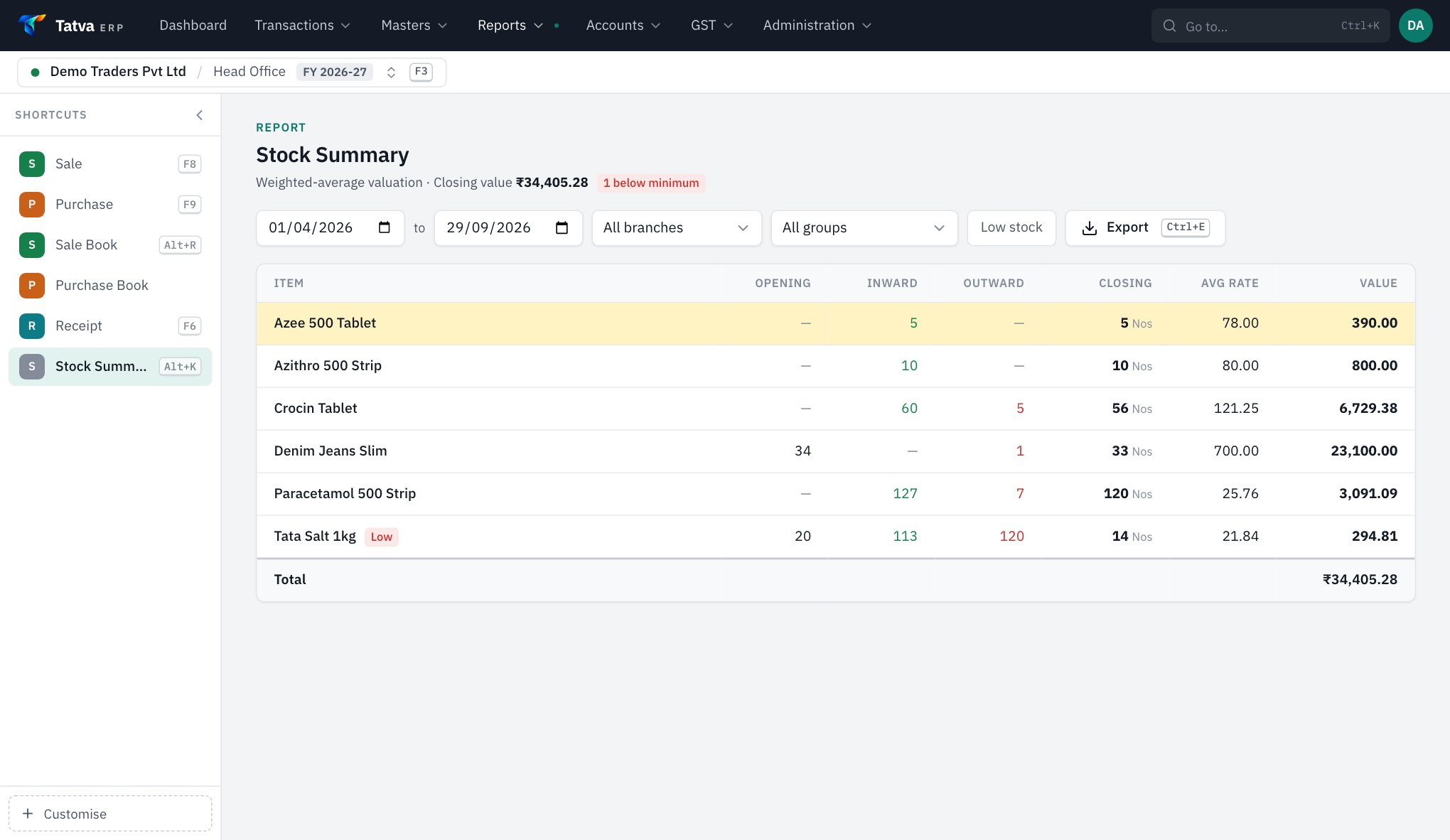
The stock summary in Tatva ERP valued on weighted average


The number on the page is the number on the invoice.
A one-time licence with a maintenance charge from year two. Excluding GST. Setup, import of your parties, items and opening balances, and training for your billing staff are included in the first year.
Starter
₹8,000first year
₹4,000 / year AMC from year two
One company (one GSTIN), one branch, two users
Start with this planBusiness
Most chosen₹15,000first year
₹7,000 / year AMC from year two
One company, two branches, five users
Start with this planCertified, audited, and stored in India.
- GST invoices, credit and debit notes in the formats the CGST Rules prescribe
- Each business isolated at the database level, not only in the application
- Data stored and processed in India
- Built by the team that runs Healthixio, ISO 9001:2015 certified




Asked before most demos.
What does Tatva ERP cost?
₹8,000 for the first year and ₹4,000 a year from year two for one company, one branch and two users; ₹15,000 and ₹7,000 a year for one company, two branches and five users. Both exclude GST. More GSTINs, branches or users are quoted on request. Setup, data import and training are included in the first-year price.
Does it generate e-invoices (IRN) or e-way bills?
Not today. Tatva ERP produces GST invoices, registers, the HSN summary and the GSTR-1 portal JSON, but it does not report invoices to an Invoice Registration Portal and does not generate e-way bills. e-Invoicing applies above ₹5 crore of aggregate turnover, so most single-branch retailers and distributors are unaffected. If you are above that threshold, tell us before you buy.
Can it replace a desktop accounting package?
For billing, stock and the books, yes: it has the vouchers, the registers, the ledgers, the final accounts and the GST returns, and it is built keyboard-first so entry speed does not drop. What it adds is one set of books across branches and access from anywhere. What it needs is a working internet connection.
Does it handle batch, expiry and sizes?
Yes. Batch-wise stock with expiry, earliest-expiry-first picking, expired stock blocked at the counter and batch-wise MRP and rates, for pharmacy, FMCG and dairy. Garments and footwear use a size grid instead, with per-size rate, barcode and stock.
Can it run more than one shop?
Yes. A company is one GSTIN with its own books and returns; branches under it keep their own stock, invoice series and cash. Users are limited to the branches they are allowed into, and a head office view shows every branch side by side.
Is Tatva ERP available now?
Yes. It is live and sold today, at the prices published on this page. A new business is usually running within a day: your parties, items and opening balances are imported, your bill format, numbering and financial year are set up, and your billing staff are trained on the screens they will use. Ask for a demo and we will show you your own kind of bill.
The other circles.










Next step
See Tatva ERP running on your own workflow.
A demo takes forty minutes and is done by someone who has installed it before. Bring the person who runs your front desk.